Account preferences and privacy
Choose your account’s theme and language. Information and requests about your personal data are available in the app footer.
Where to go Sidebar → Preferences · Footer → Privacy
How to do it
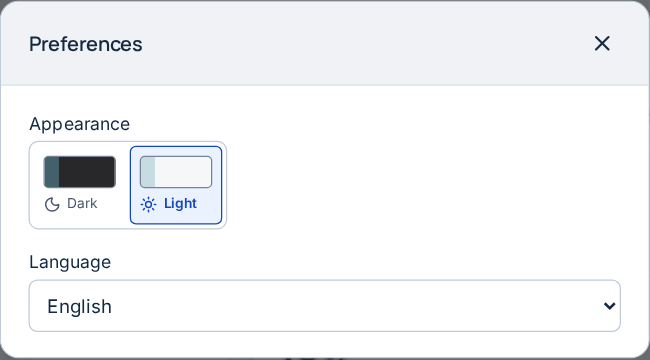
- Open Preferences at the bottom of the sidebar. Select the theme and language you want.
- Close the dialog after the change is saved. To see your data status or manage a privacy request, open Privacy in the footer.
Example
For a light interface in English, select Claro and English in Preferences.
Fields and options
- Appearance
- Choose Light or Dark. The selection is saved for your ScopeTime account.
- Language
- Choose Português or English. This changes the app menus and messages. Project, activity and issue names use the wording entered by your organization.
- Last report of your account to Atlassian
- In Privacy, shows the date of the last report. Next scheduled report gives the next date when available.
- Privacy confirmation
- For permanent erasure, read what will be erased and type ELIMINAR. The operation erases personal ScopeTime data and can change report groupings. Native Jira worklogs remain in Jira.
- Reactivate storage
- After erasure, type REATIVAR to enable storing new data again. Previously erased preferences and calendars cannot be restored.
- Refresh status
- Check the outcome of a previous request before repeating any privacy action.
No matching field.
How to check
Reopen Preferences to check the saved choices. For a data request, use Privacy to check the status for your account.